


Own it · No subscription · No per-seat fees
PULSE · THE BUSINESS PLATFORM

Own the software that runs your whole business.

Pulse, by Pendragon Enterprises: the company’s HQ, sales, dispatch and double-entry accounting on one platform. Buy it once, install it on a computer in your office or a server you rent, and it’s yours: no monthly bill, no per-seat fees. Add the AI harness when you want one.

One-time site license · no per-seat fees · 30% off for early adopters
Pulse sales analytics
Replaces Your accounting subscription Your CRM's per-seat fees The scheduling app and the punch clock The dispatch whiteboard The per-task automation bill Your monthly software bills → one platform you own
Pulse — the platform

Four systems that finally agree with each other.

Pulse HQ runs the company itself. A won deal becomes a work order, an invoice and a posted journal entry, in one chain. Nothing is re-typed between the shop, sales, the field and the books.

A company owner with a tablet talking with a colleague in her open office and stockroom
In the officeThe schedule, the board and the pipeline, on the desk and on the shop-wall tablet.
A field technician at a mechanical-room panel checking his phone
In the fieldToday’s route, the job briefing, parts and the customer’s signature, on the phone.
A bookkeeper at her desk with a laptop and calculator, smiling at a colleague
In the booksEvery invoice and payment already posted, and the month closes against the same numbers.

The company’s headquarters: the schedule on the wall, the time clock, the break room board.

The people side of the business, out of spreadsheets and group texts. Built for desks, workstations and a tablet on the shop wall. Every Pulse license starts here.

  • ✓ Weekly shift schedule: templates, open shifts, swaps and a publish button
  • ✓ Time clock with breaks and timesheets; approved hours go to Books for payroll
  • ✓ Time off with balances and approvals; holidays and closures on one calendar
  • ✓ A break room board for notices, events, polls, sign-up sheets and shout-outs, with read receipts
  • ✓ People directory and org chart, certifications with expiry dates
  • ✓ Places and assets: what is kept where, and who holds it
  • ✓ Renewals that remind you before a license, policy or registration lapses
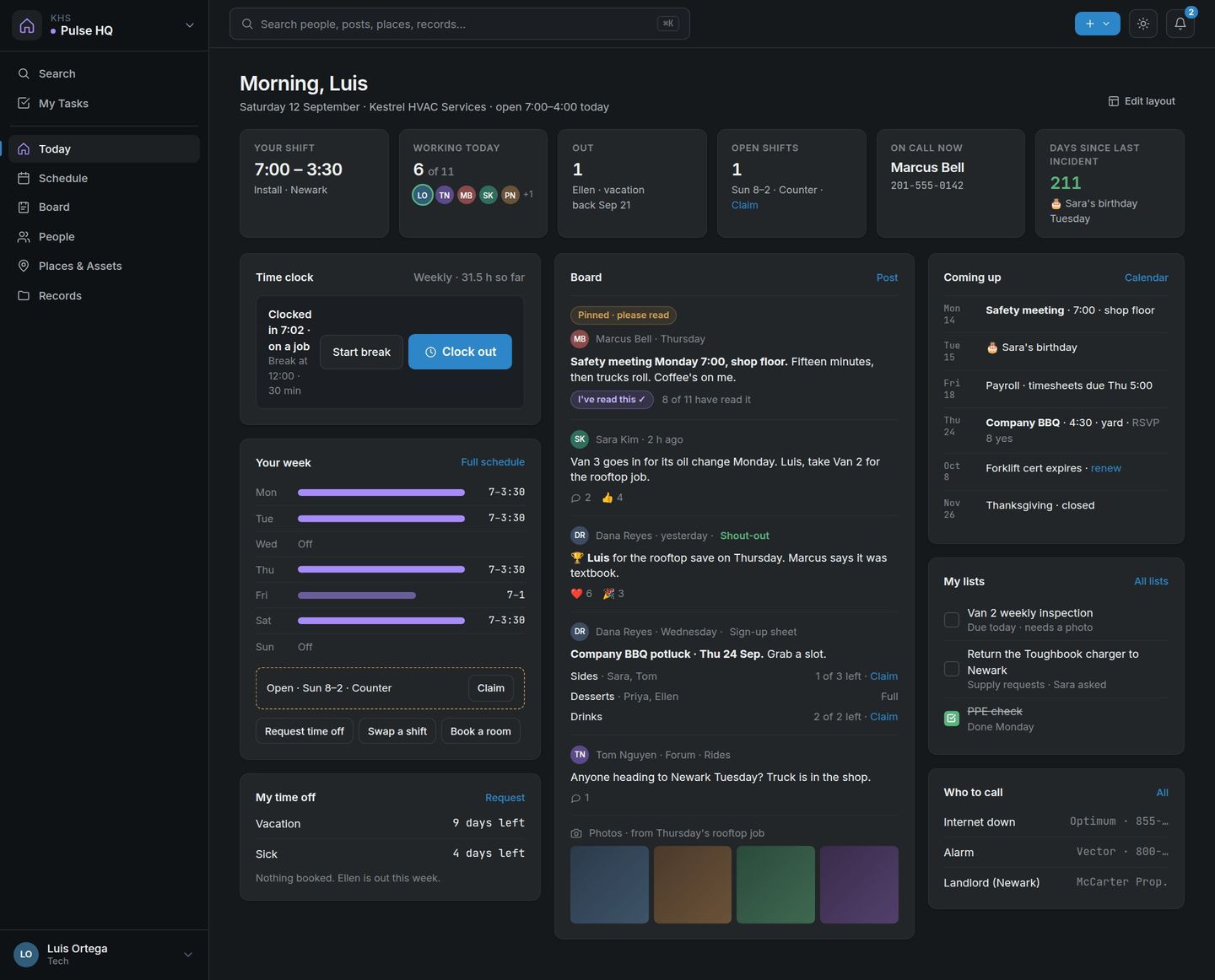
Pulse HQ Today page: your shift, time clock, the board and what is coming up
See more of Pulse HQShow less of Pulse HQSchedule, board, people, places
Pulse HQ

Everything a small company keeps on a whiteboard, in one place.

The schedule, the break room board, the filing cabinet and the sign-in sheet, on the company’s own server. Every employee can have a sign-in that opens here.
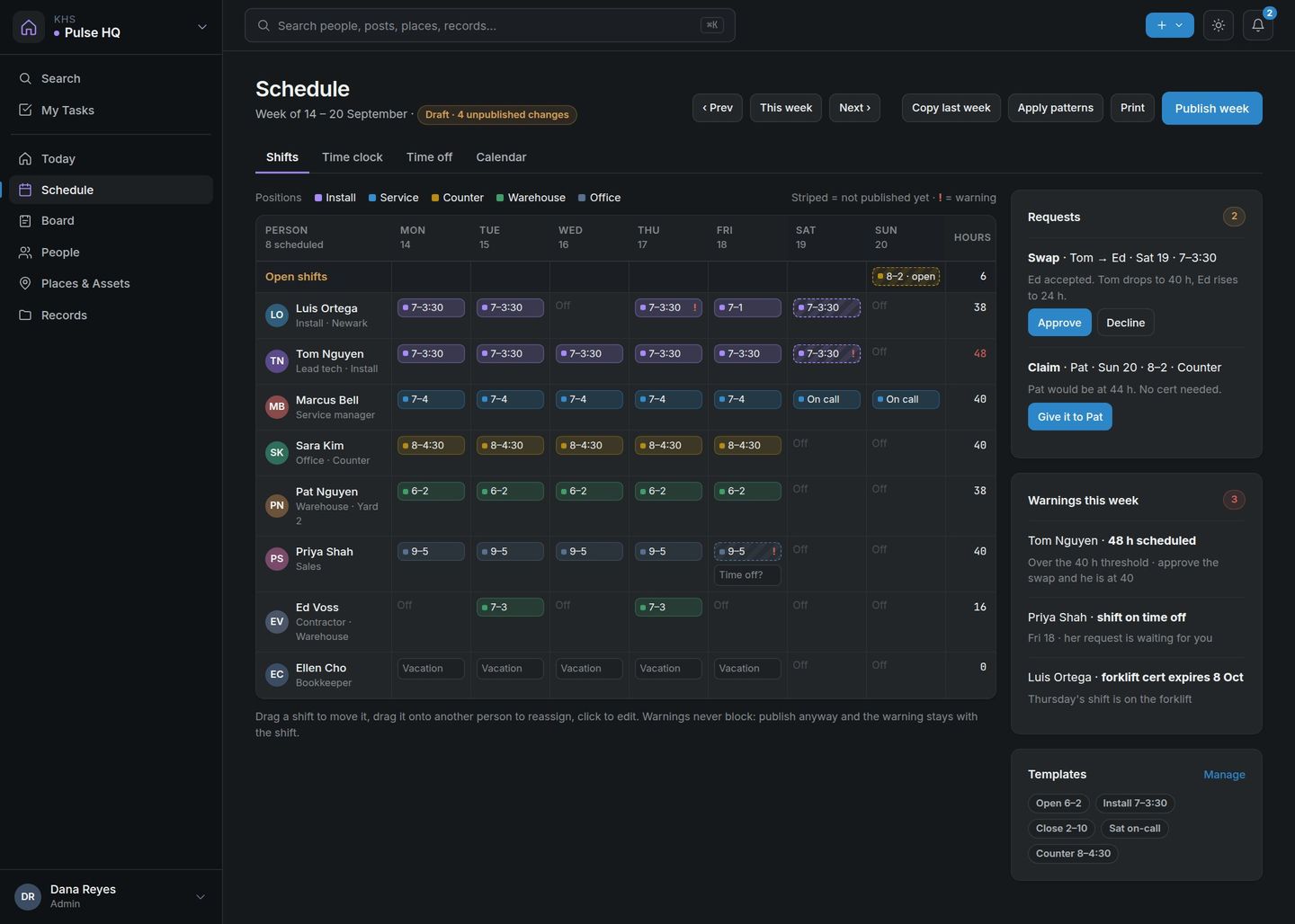
Weekly staff schedule with open shifts, swap requests and warnings
Schedule. Drag shifts, copy last week, publish when it’s right. Requests and warnings sit beside the grid.
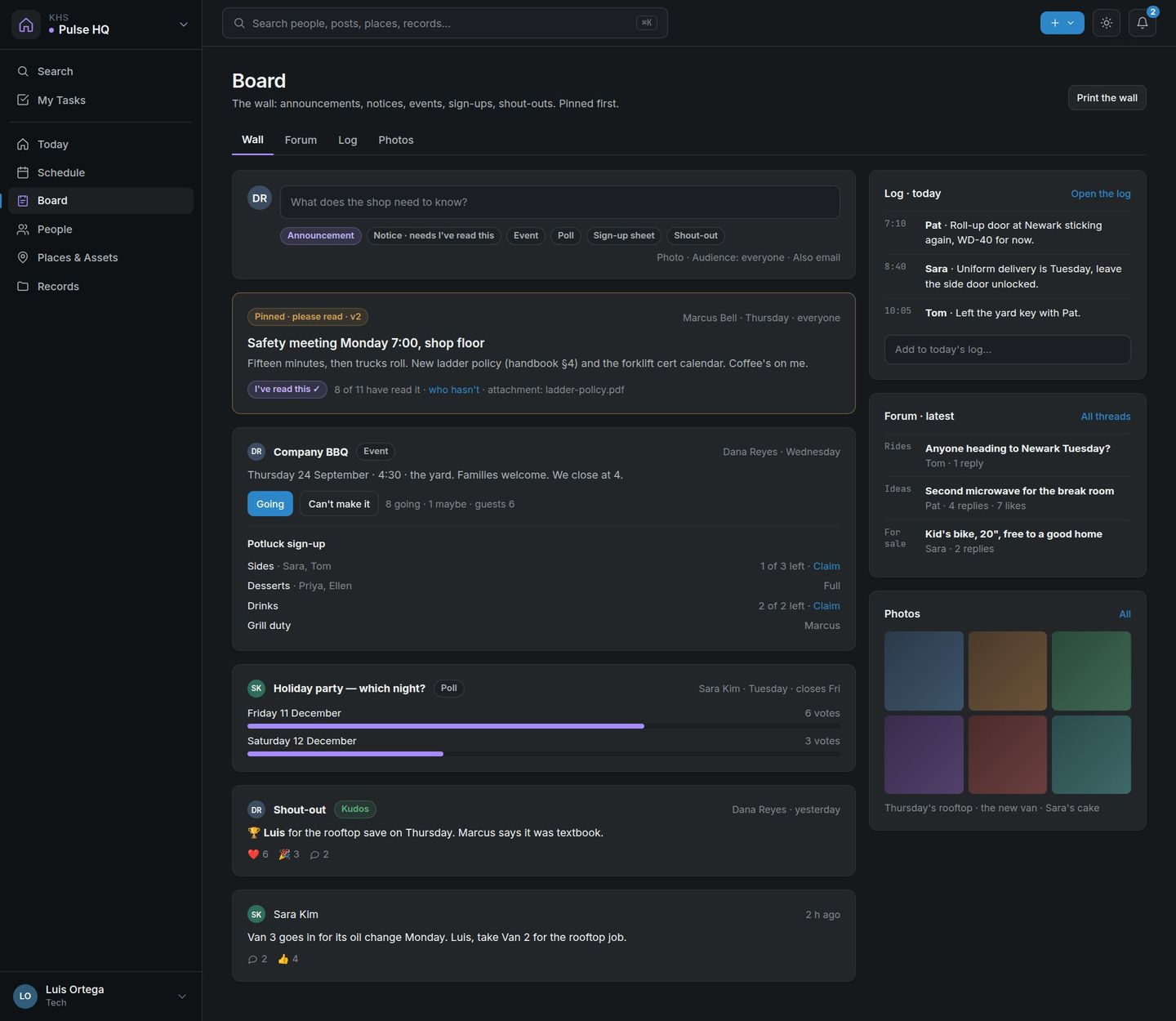
Company board with a pinned safety notice, a potluck sign-up sheet and a shout-out
Break room board. The safety meeting, the potluck sign-up, a shout-out for the rooftop save. Pinned posts ask for a read receipt.
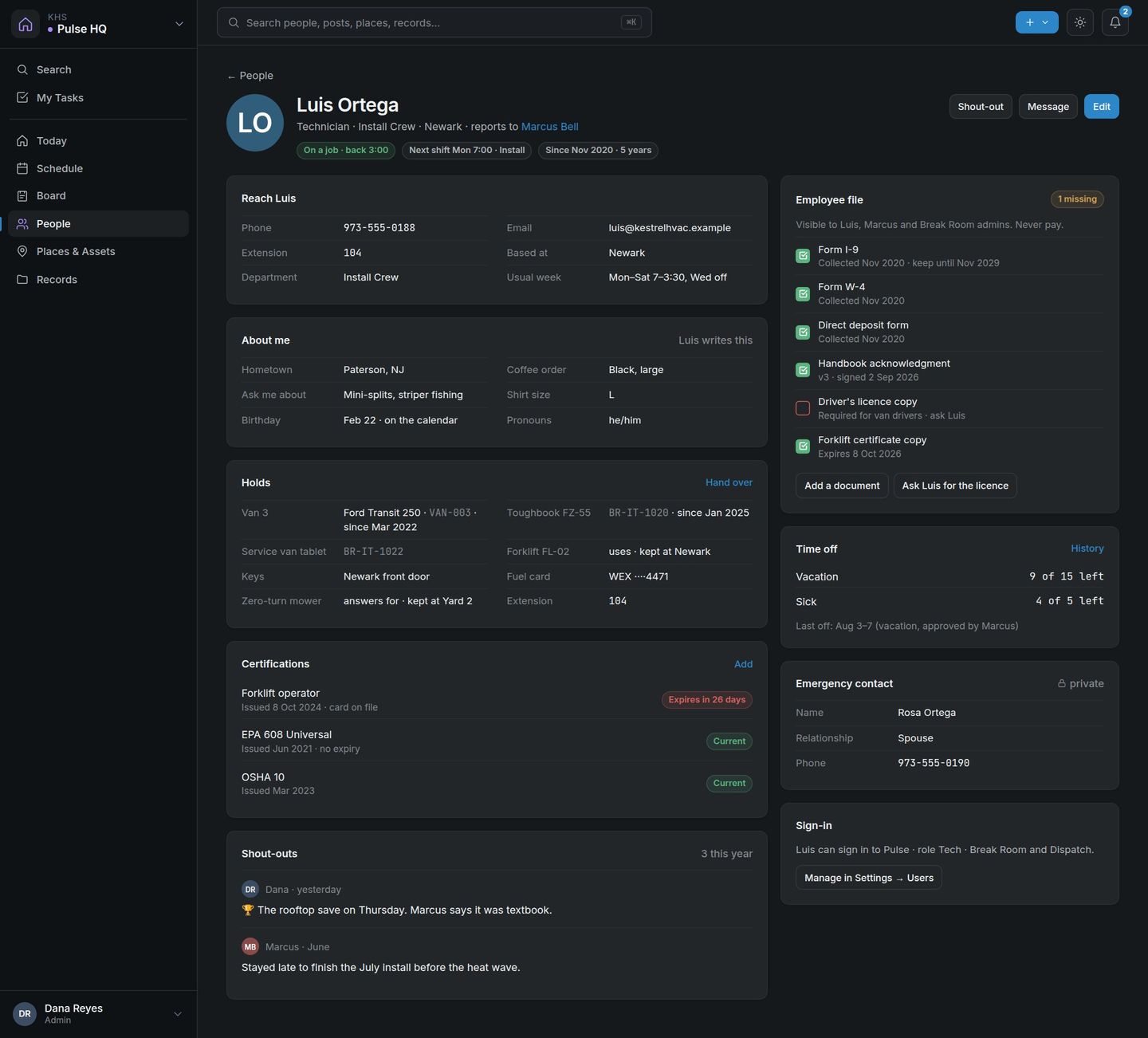
A person page: contact details, what they hold, certifications and their employee file
People. One page per person: how to reach them, what they hold, their certifications and their file.
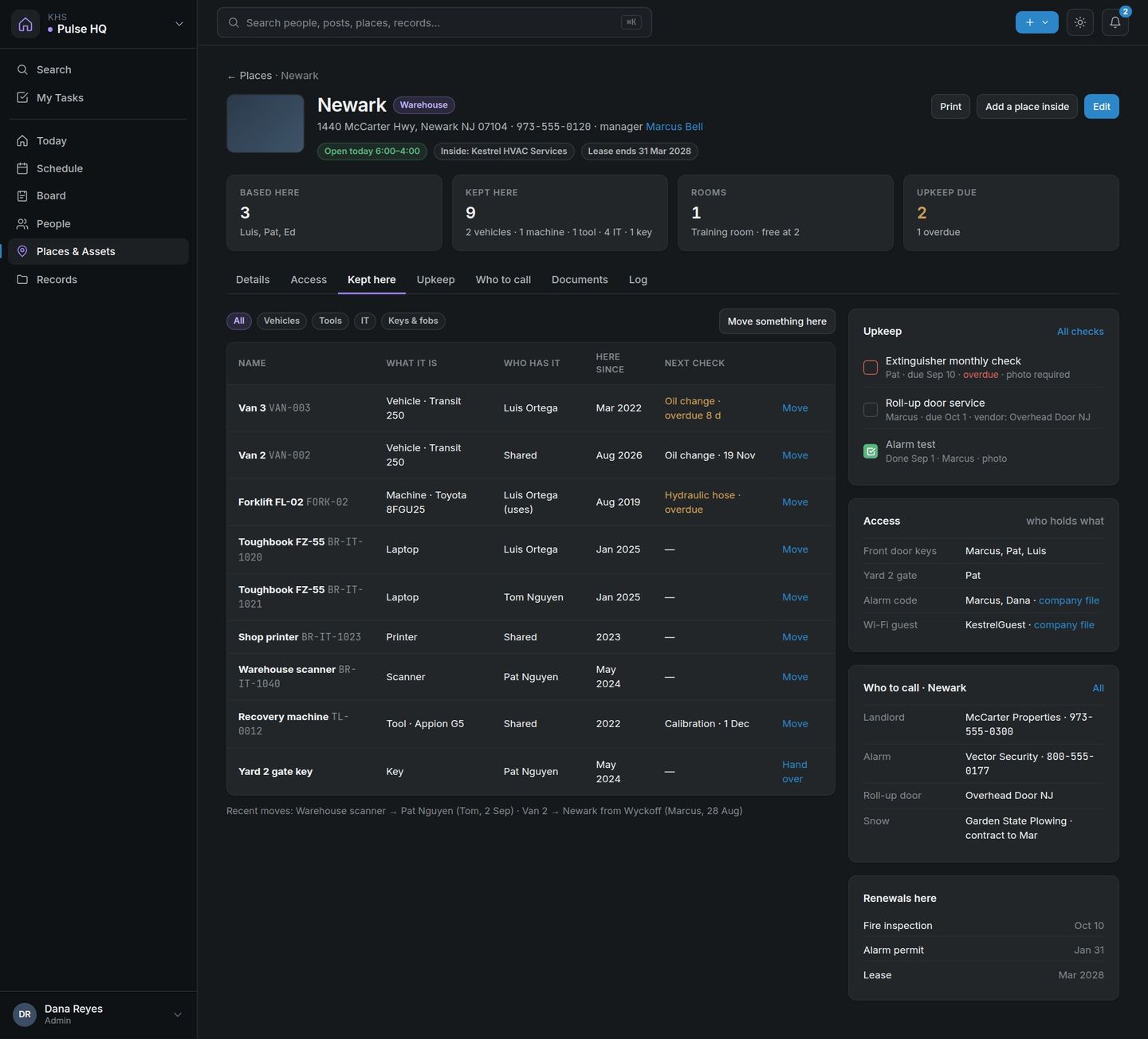
A place card: hours, who is based there, what is kept there and who to call
Places & assets. Every location with its hours, its keys, what is kept there and who to call when the alarm goes off.

Quote and close, without the busywork.

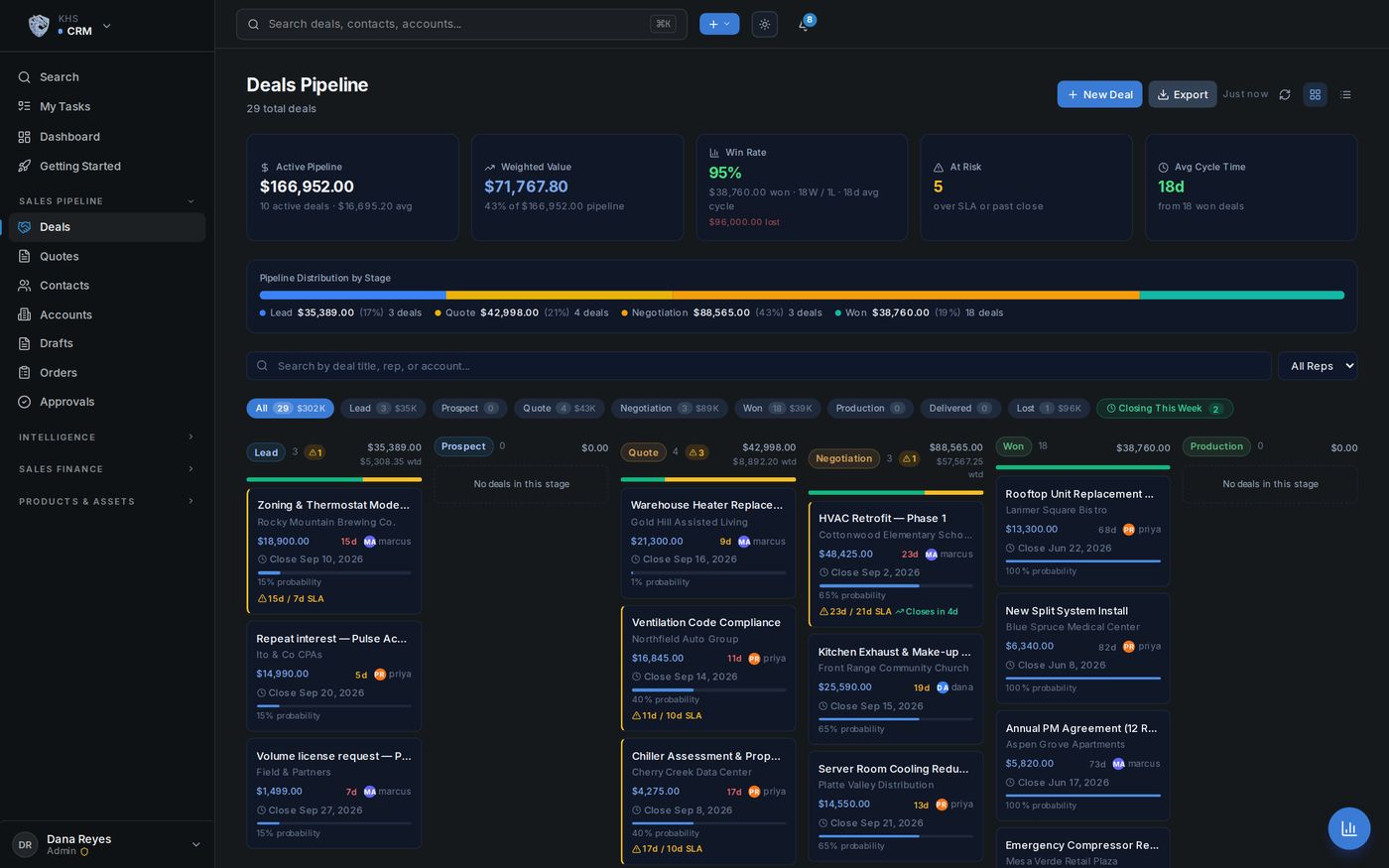
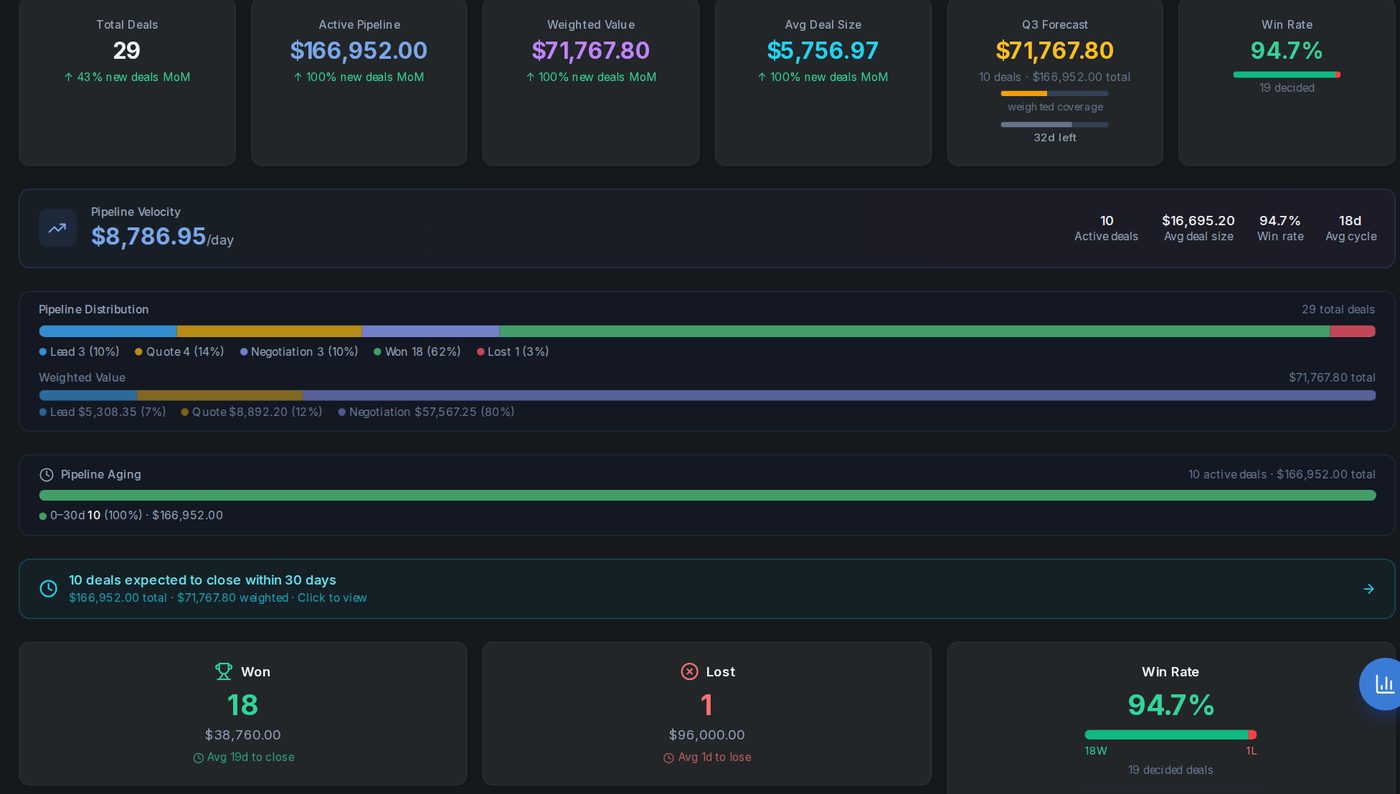
A pipeline your reps keep current, quotes they build themselves, and a forecast weighted by real probability. Commissions are calculated the moment a deal is won.

  • ✓ Kanban pipeline with weighted forecasting
  • ✓ Rep-built quotes with warranty & contract pricing
  • ✓ Auto-commissions & order hand-off on close
  • ✓ Price lists, contract pricing and a margin guard: below-cost quotes go to a manager before they go out
Sales pipeline
See more of Pulse CRMShow less of Pulse CRMSales charts, lead to order
Reports & charts

The numbers, drawn.

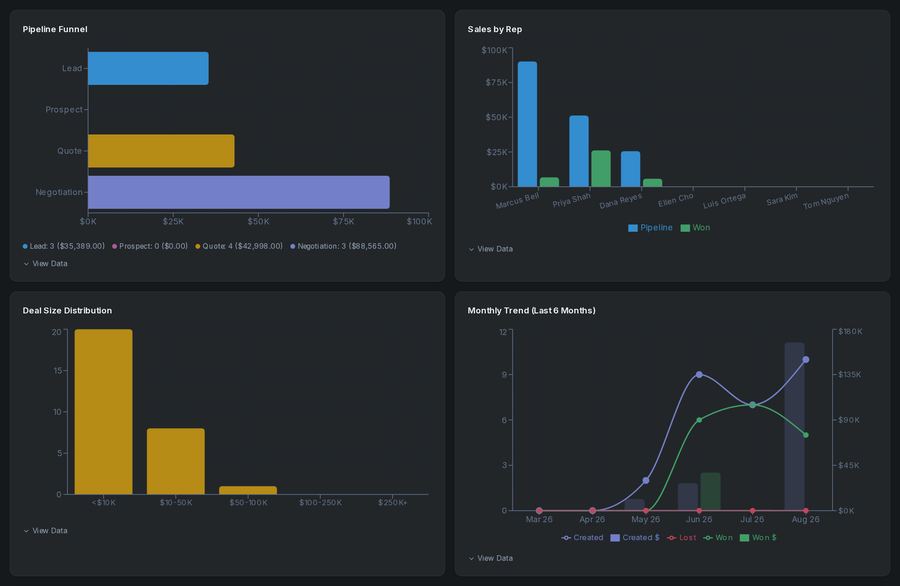
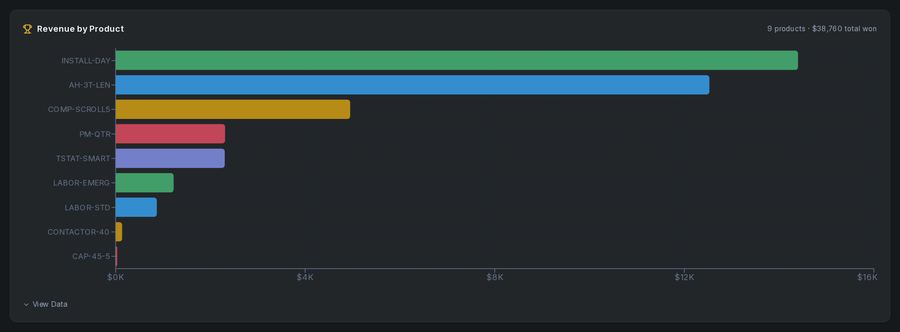
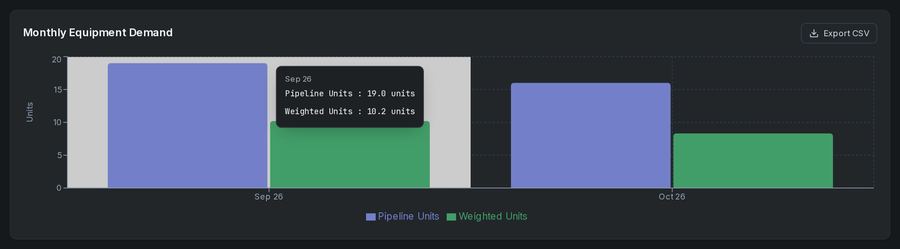
Every chart reads live from your own database. No exports, no spreadsheet. Sales, product and demand charts are here; the accounting charts are under Pulse Books.

Pipeline funnel, sales by rep, deal-size distribution and monthly trend charts
Revenue by product bar chart
Monthly equipment demand forecast chart
From the lead to the order

The pipeline reaches past the sale.

Leads arrive from your own website, quotes turn into purchase orders, and the stock forecast reads your open quotes.

🌐

Your website, wired in

A lead form for your own site that lands in your pipeline. With the AI harness, a customer chat assistant that answers from your data.

📦

Inventory that watches your pipeline

Parts with reorder points, and a stock forecast that weighs your open quotes.

🛒

Purchasing & receiving

Quotes become purchase orders; receiving updates the books.

From the rooftop to the invoice.

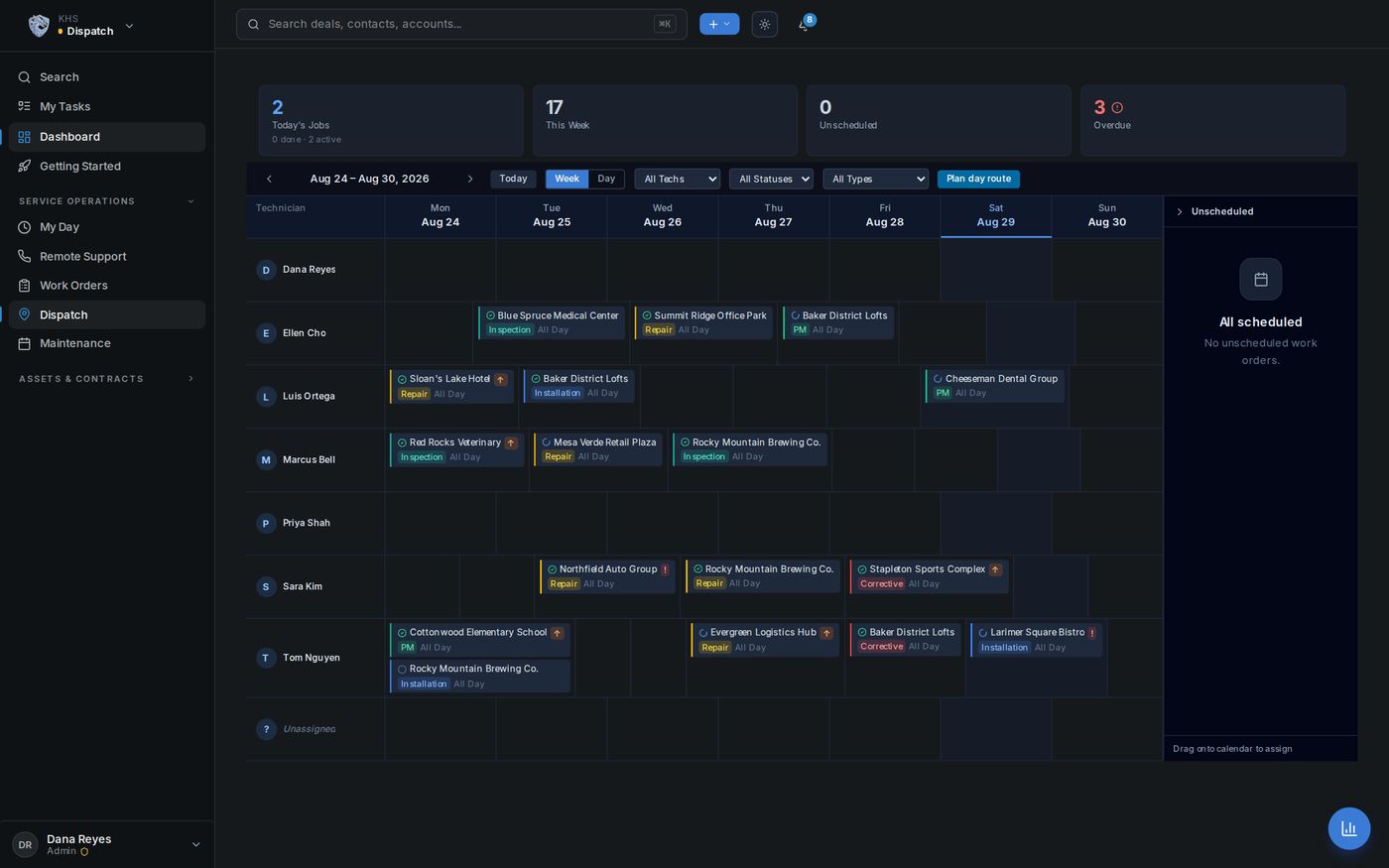
Crews raise jobs against a customer or a machine and work the whole day here, without a CRM login. Dispatch board, work orders, maintenance schedules, and a mobile field report with photos, parts, time and signatures, so every job gets billed.

  • ✓ Work orders with parts, labor & photo documentation
  • ✓ Day routes: stops mapped, ordered and dispatched in one click
  • ✓ Tickets against a machine under contract, for a single call or a service agreement
  • ✓ Multi-visit repairs & follow-up work orders
  • ✓ Maintenance by date or by meter (miles, hours, impressions), whichever comes first
Dispatch board
See more of Pulse DispatchShow less of Pulse DispatchWhy owners switch, where the hours come back
Why owners switch

Built for the way a trade business really works.

The crew, the office and the books work from the same records, so the job finished on the roof is the invoice by the afternoon.

🔗

One source of truth

Sales, service and accounting share the same data. Change it once and it’s changed everywhere.

📱

Field-ready on any phone

Techs log parts, time, photos and signatures from the roof. The paperwork becomes an invoice automatically.

🗺️

A day's route in one click

Give it the day’s stops; it maps and orders them and assigns the run to your tech.

🔐

Right people, right access

Reps sell, the office bills, techs do the field work. Each role sees only what it should.

🔍

It audits itself daily

Work never invoiced, jobs over quoted labor, quotes below cost, parts under reorder, maintenance past due: flagged daily with the dollars at stake.

🚀

Guided setup

A checklist that checks itself off against your real data. When a spreadsheet column is ambiguous, the import asks.

All of this ships in the Pulse Business Platform: standalone software on your own server. The AI harness is the add-on for when you want more. Get your license →

Where the hours come back.

The office work that stops being work:
  • → The day’s route plans itself: stops mapped, ordered and dispatched in one click.
  • → Overdue invoices chase themselves. Reminders go out on the schedule you set.
  • → The field report becomes the invoice: parts, hours and photos flow straight to billing.
  • → Statements, recurring billing and month-end reports assemble themselves.
All of that is in the Pulse Business Platform, before the AI harness is added.

Accounting that keeps up with the work.

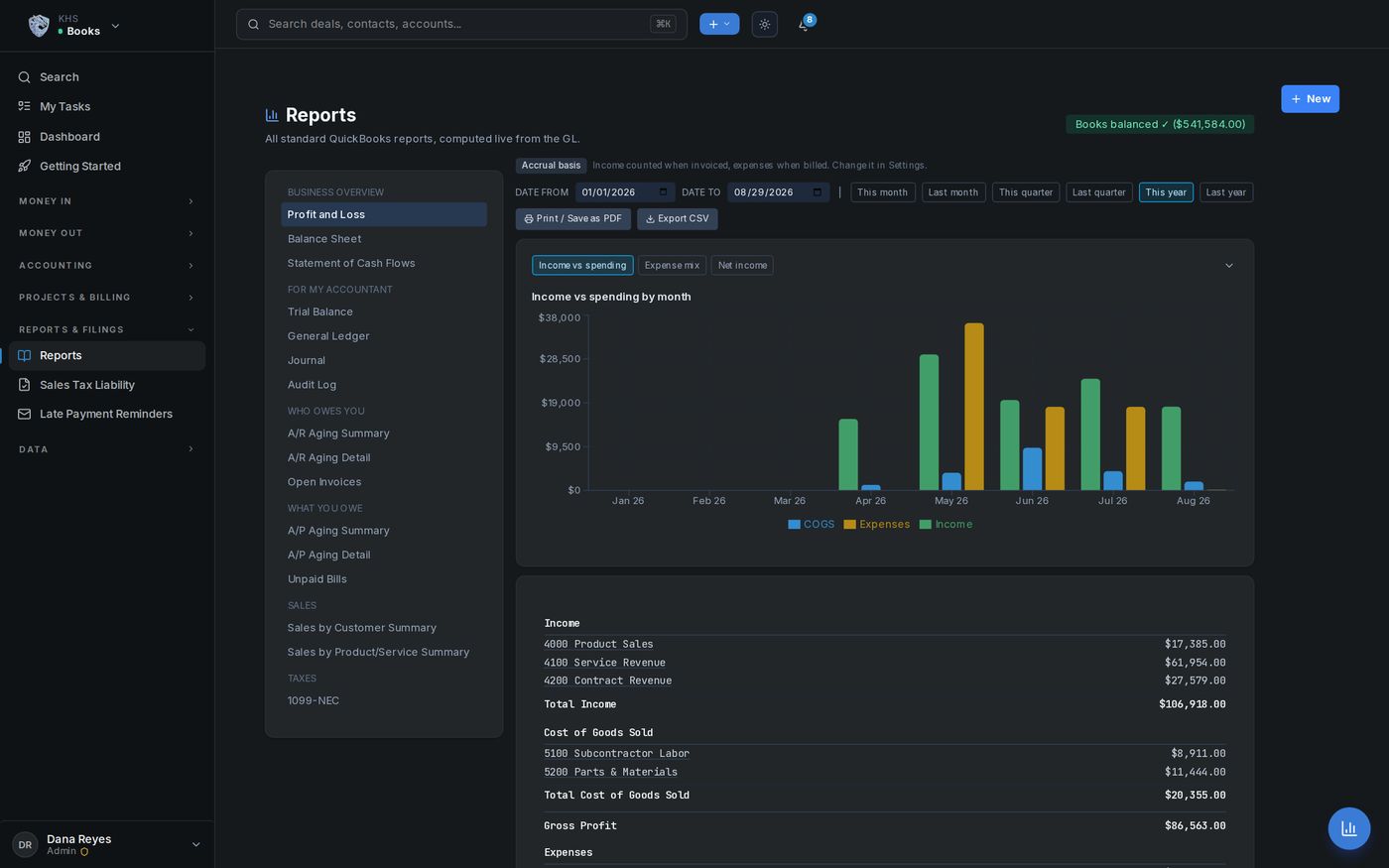
Double-entry accounting that posts as the business runs: A/R, A/P, deposits, bills and a full chart of accounts. P&L, balance sheet and trial balance come straight from the ledger, ready to hand to your accountant.

  • ✓ Invoices, payments, deposits, bills & credit memos
  • ✓ Vendor bills, purchase orders & receiving
  • ✓ P&L, balance sheet, cash flow, sales tax & 1099s
  • ✓ Bank reconciliation, recurring billing and automatic overdue-invoice reminders
  • ✓ Expense management: import a card statement and it becomes categorized expenses
  • ✓ Customer statements and period close
  • ✓ QuickBooks import in the setup wizard; full export any time
Books — Profit and Loss
See more of Pulse BooksShow less of Pulse BooksBooks that keep themselves, money charts
One set of numbers

Your books keep themselves.

The job your crew finished this morning is a posted entry by lunch. No one re-types it, and no one rebuilds the month in its last week.

1
database behind HQ, sales, dispatch and your books
0
numbers re-typed from the field into the office
Live
your P&L reflects this week's work, not last month's
Yours
export the whole ledger whenever you like
🧾

Books you can hand your accountant

Hand over a clean set of books at year end instead of a shoebox and an apology.

🧾

Expense management included

Card statements import straight into categorized expenses, tied to the jobs and deals they belong to.

📸

Scan a bill (AI harness)

Photograph or PDF a vendor bill and the AI harness reads the vendor, dates and line items into an entry for your review. Repeat bill numbers are flagged before you pay twice.

Books charts

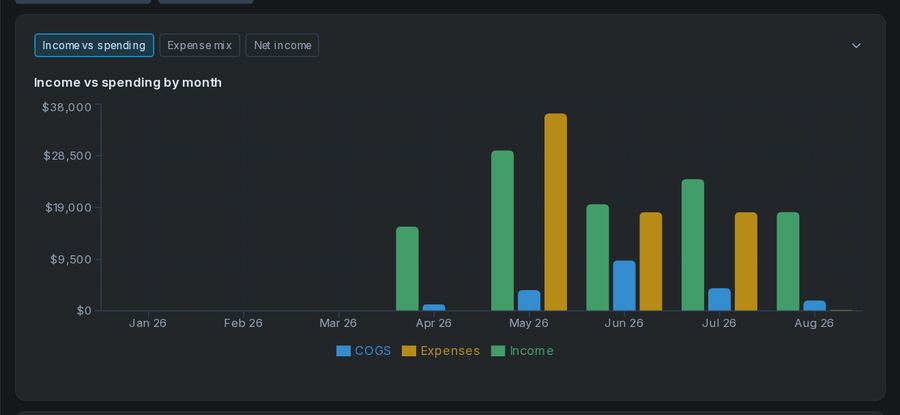
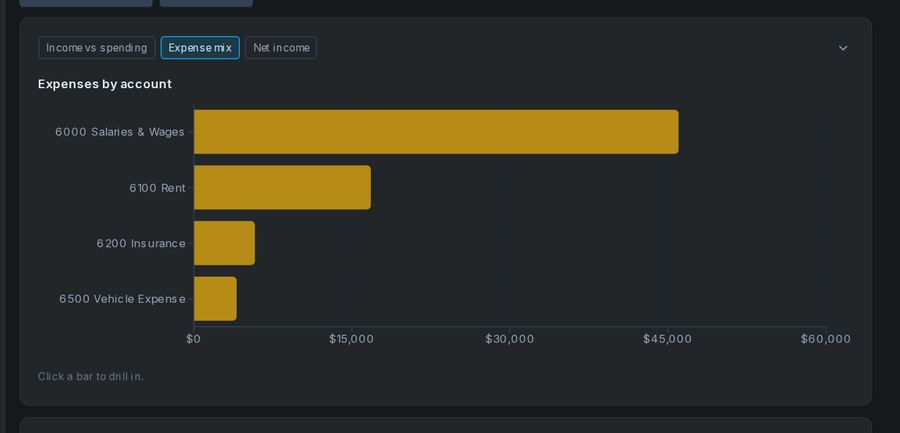
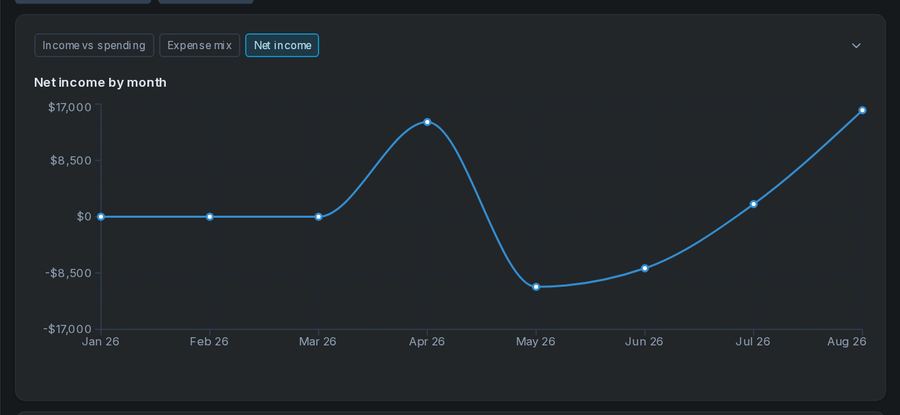
Where the money went, by month.

Income against spending, the expense mix and net income, drawn straight from the ledger.

Income versus spending by month
Expense mix chart
Net income by month line chart
Included extras

What other software charges extra for comes in the box.

Works across every module Included with CRM, Dispatch or Books

Automation comes in the box. No per-task bill, no premium tier.

Build the workflows your business runs on: a quote gets its follow-up, a big discount waits for a manager’s OK, a new customer gets a welcome. Automations come with every Pulse package that has CRM, Dispatch or Books, with no cap on how many you build or how often they run, on your own server.

  • ✓ A visual builder your office manager can read
  • ✓ Approvals from a one-time email link, the bell in Pulse or the phone app
  • ✓ Starter packs for your kind of business, test runs and full run history
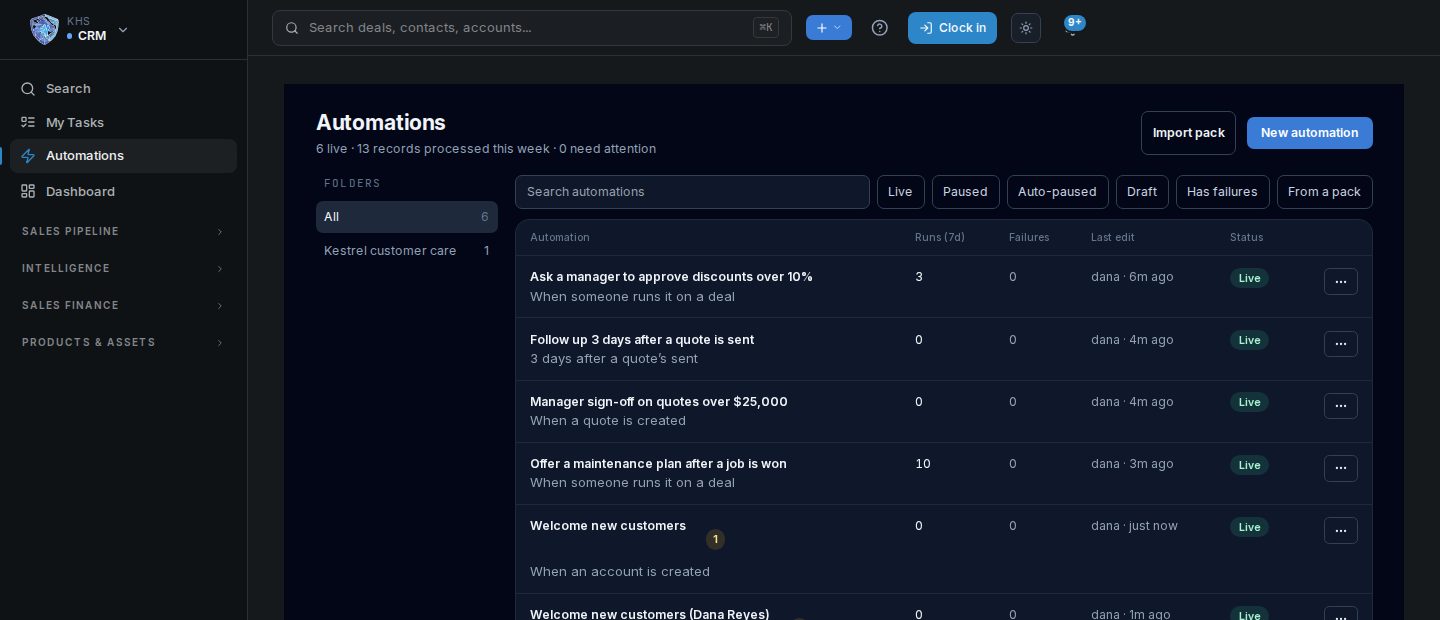
The automations list: five live automations with their runs and failures this week
See more of AutomationsShow less of AutomationsBuilder, approvals, starter packs, test runs

Draw it once. It runs every time.

Pick what starts it, then add the steps underneath. A visual builder your office manager can read, laid out the way a HubSpot consultant already works.

  • ✓ Starts when a record is created or changed, when a date comes round (a contract ending, an invoice due, a maintenance visit), on a schedule, or from a button on the record
  • ✓ Business events built in: an invoice goes overdue, a work order is completed, a web lead arrives
  • ✓ Steps that update records, create tasks, email customers, notify or text your team, call a webhook, wait, branch and ask for approval
  • ✓ Field-service and Books steps when you have Dispatch or Books
  • ✓ Every version is kept, with undo and redo while you build
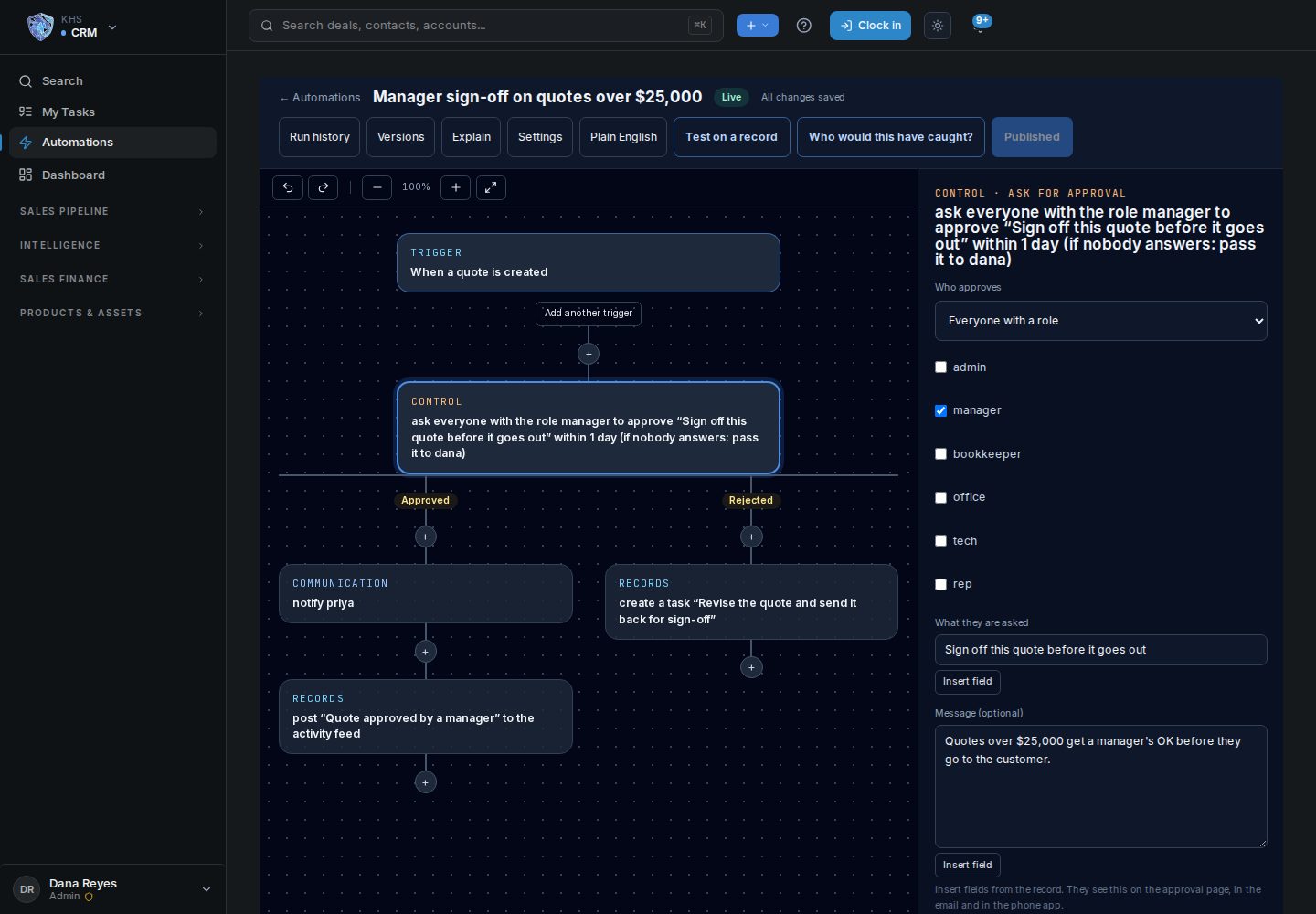
The automation builder: a new quote over $25,000 asks a manager to approve; approved notifies the rep, rejected creates a task to revise the quote

A manager’s OK before it goes out.

Put an approval step anywhere it belongs: a discount over 10%, a quote over $25,000. The approver can decide from a one-time link in their email, from the bell in Pulse or on the Pulse phone app, and can change the figure before approving.

  • ✓ Nobody approves their own change: the person who started the run sees the request but can’t decide it
  • ✓ A deadline on every request, an optional reminder before it, and your choice of what happens if nobody answers: reject, approve or pass it to someone else
  • ✓ Approved and rejected each take their own path
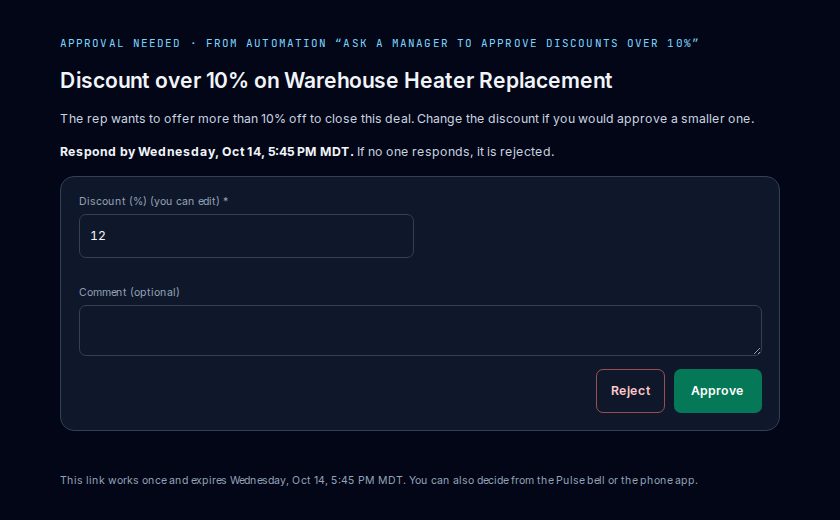
An approval opened from its email link: a discount over 10% on a heater replacement, the discount the manager can change, the deadline, and Reject or Approve

Start from a pack built for your kind of business.

Pulse ships with ready-made starter packs. Service business: route new web leads, follow up overdue invoices, remind customers before a service contract ends, ask for a review after a job. Plus packs for higher-ed admissions, K-12 re-enrollment, nonprofit gift acknowledgment and professional services.

  • ✓ Every pack arrives turned off, so you read it before anything runs
  • ✓ Export your own automations as a pack and install them on another Pulse
  • ✓ A pack update shows what changed, old and new side by side, before anything is replaced
  • ✓ Pendragon’s packs are signed; anyone else’s is clearly marked third party
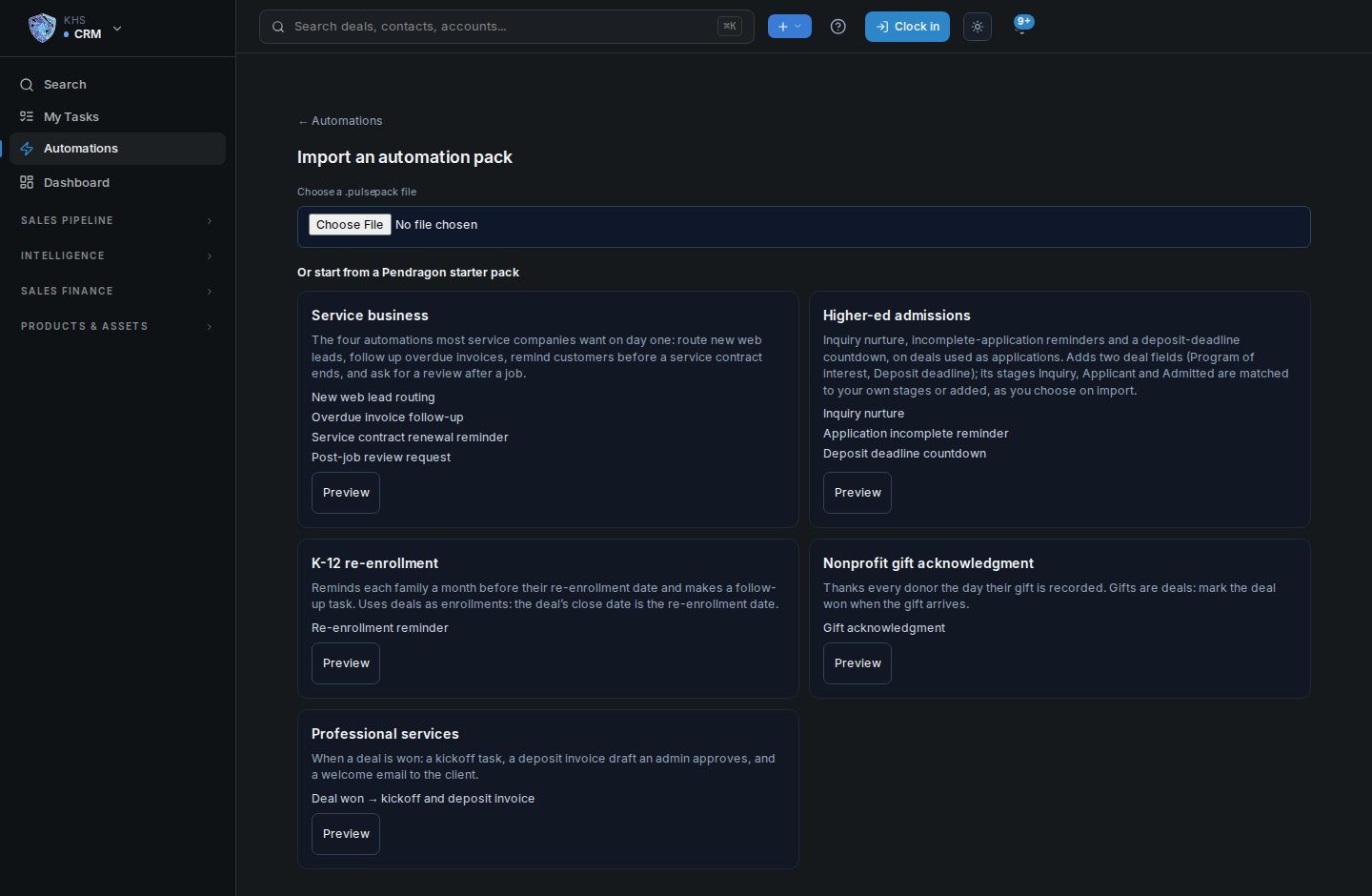
The five Pendragon starter packs: service business, higher-ed admissions, K-12 re-enrollment, nonprofit gift acknowledgment and professional services

See what it will do before it does it.

Test an automation on a real record before you publish it. Pulse shows exactly what would have happened, and nothing is sent or saved. Every automation also reads back in plain English, so anyone can check what it does.

  • ✓ Before you turn it on, see which records it would have caught
  • ✓ Every run in its history, step by step
  • ✓ Failed runs collect in one place; fix the cause and retry them
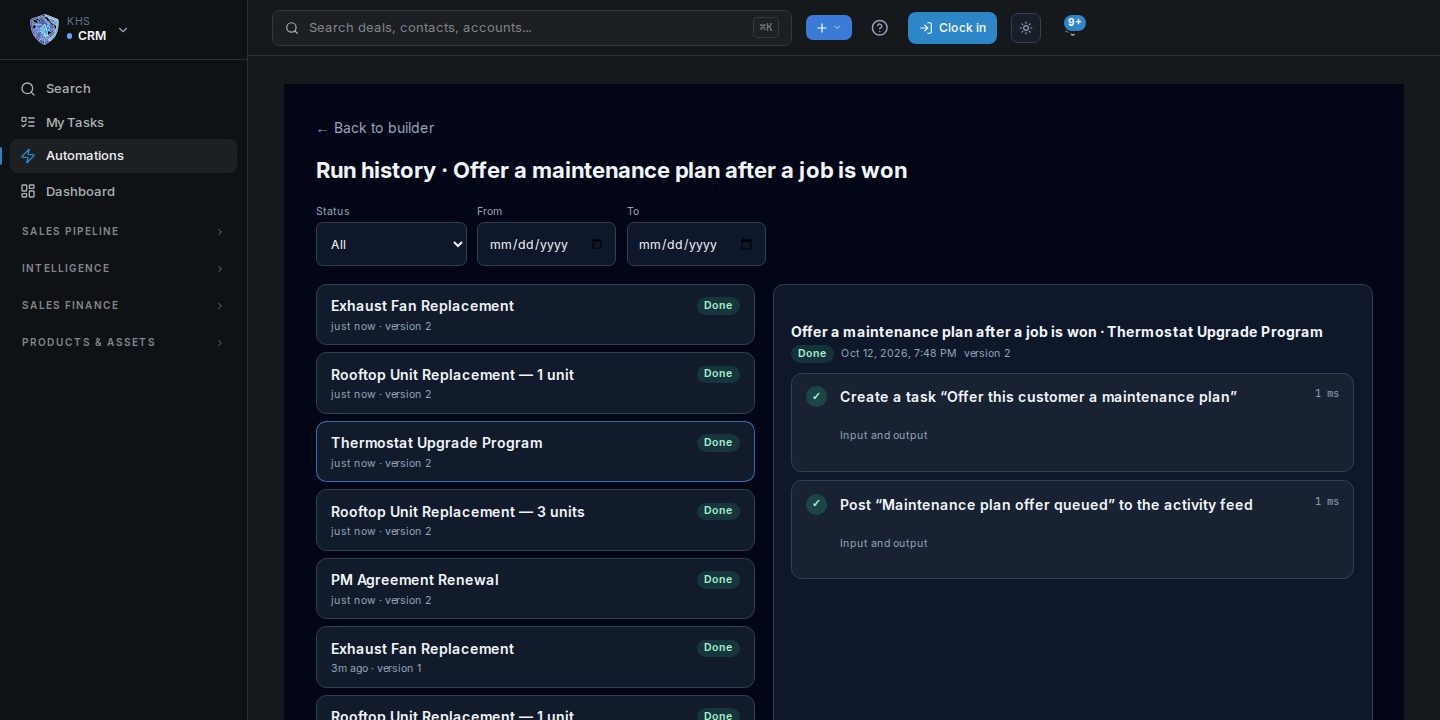
Run history: one completed run per won job, with the steps of one run open
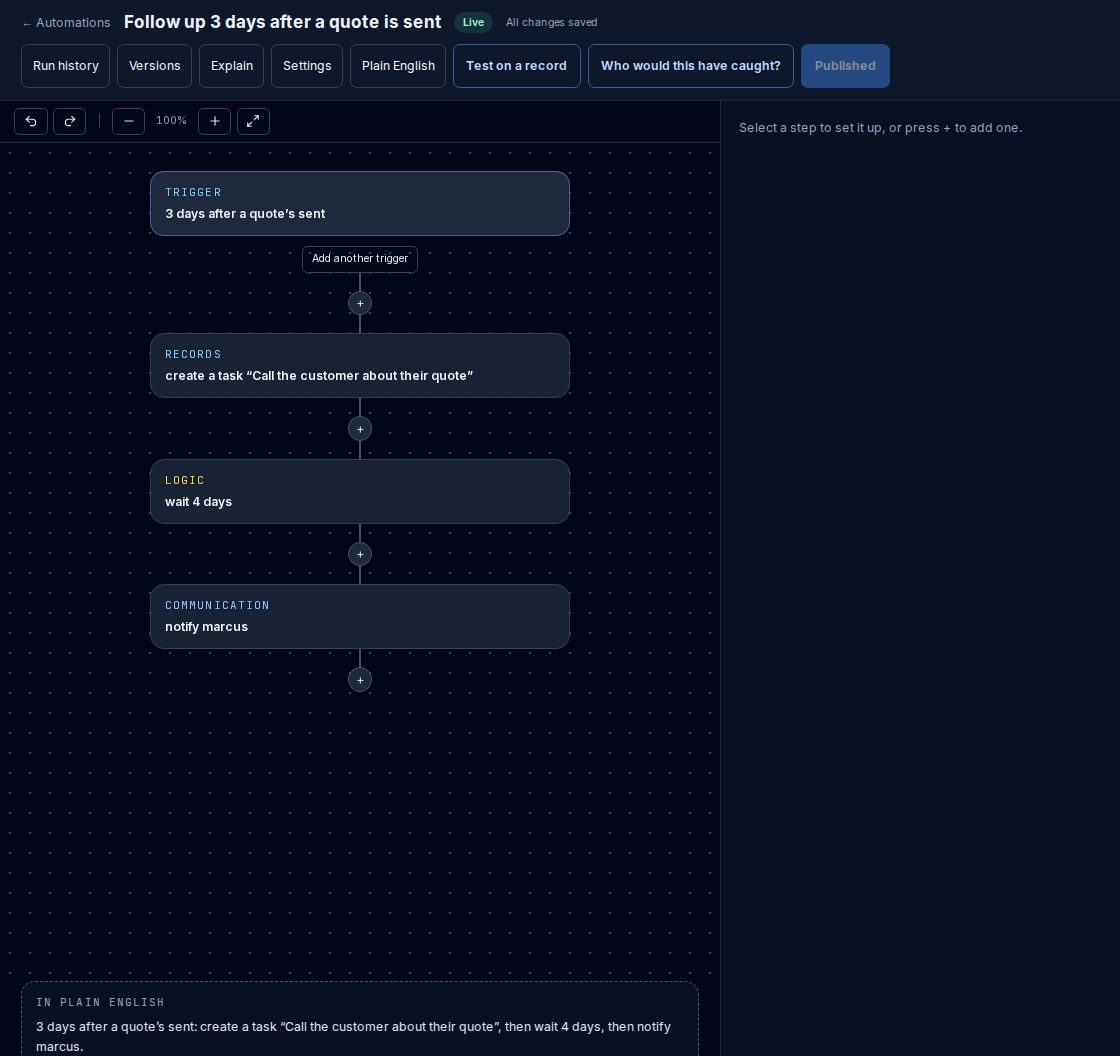
A quote follow-up automation on the canvas with its plain-English summary underneath
In plain English. “3 days after a quote’s sent: create a task, then wait 4 days, then notify Marcus.” Written by Pulse from the steps, no AI needed.
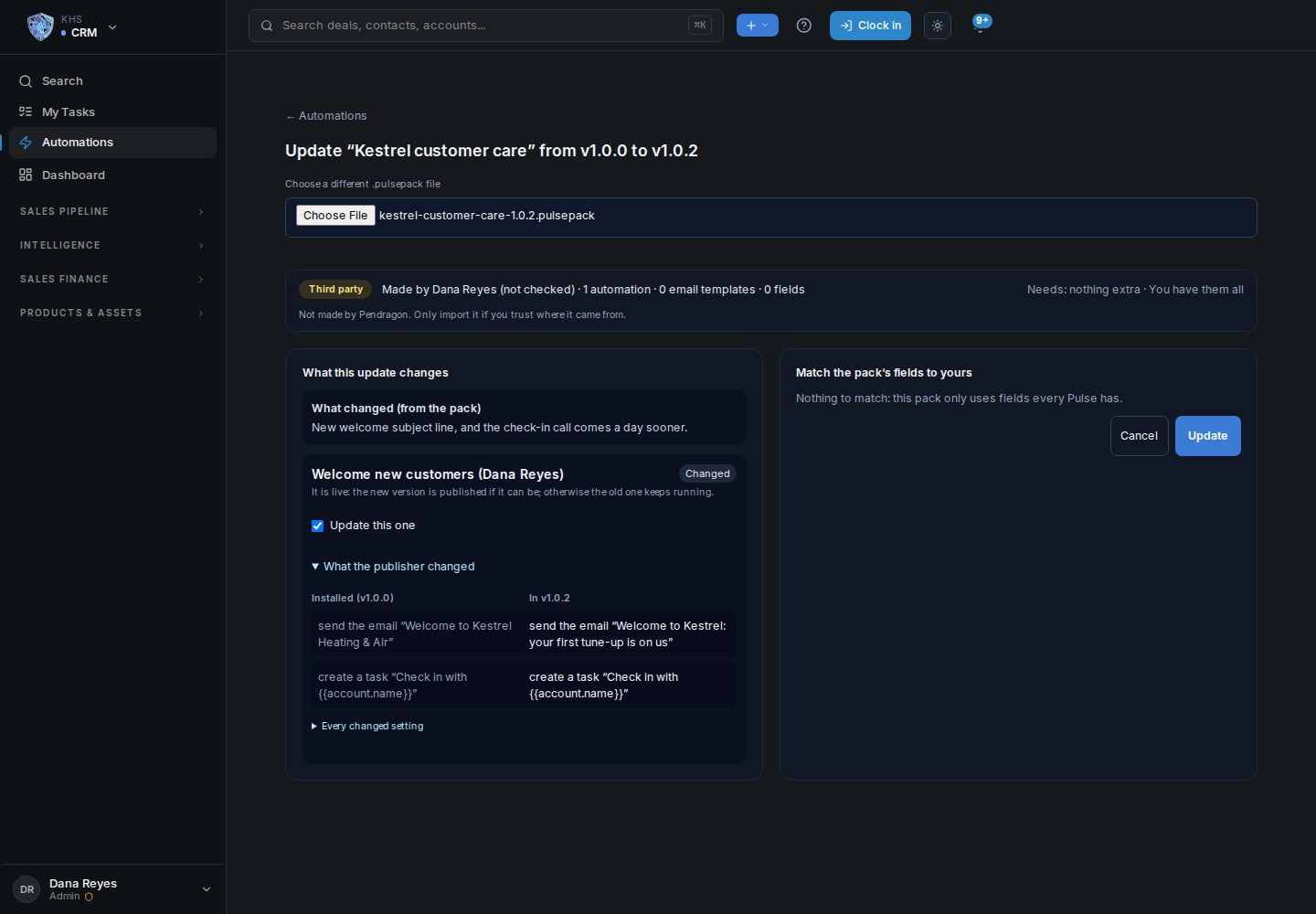
A pack update: the publisher's note, and the installed and new version of a step side by side
Updates you can read. A new version of a pack shows each change next to what you have now. You pick which automations to update.
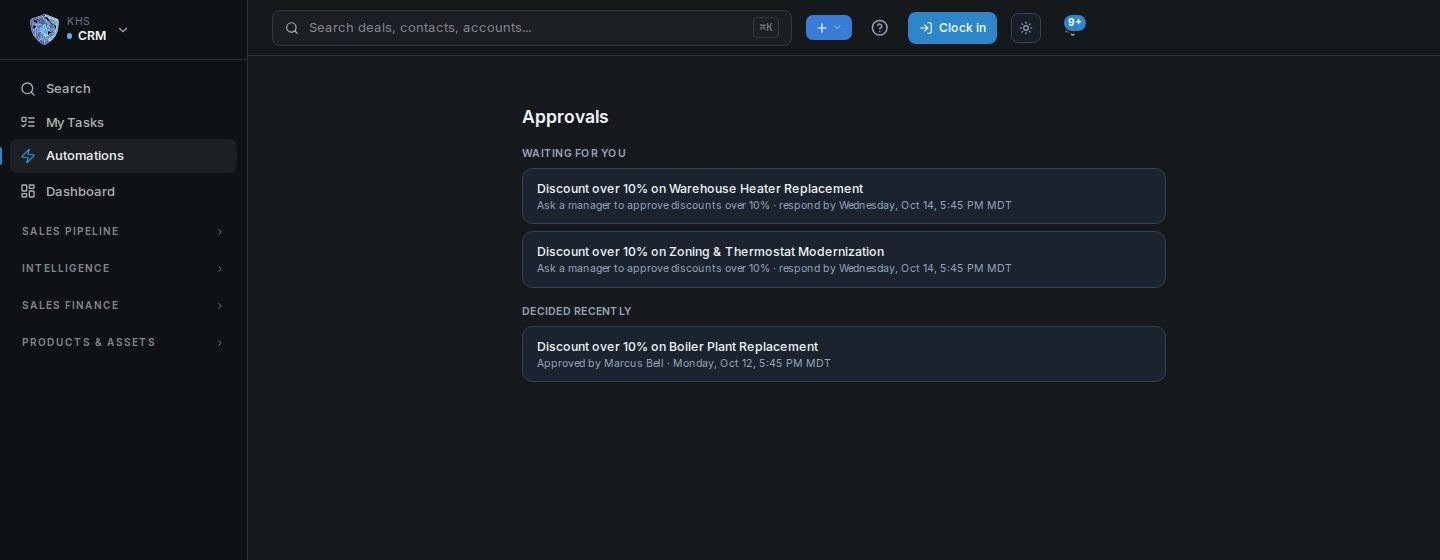
A manager's approvals inbox: two discount requests waiting and one approved
One inbox for approvals. What is waiting for you, and what was decided recently, by whom.
Elsewhere, automation is a monthly line

Billed by the task, or locked in a higher tier.

The busier you get, the more a metered plan charges: see how the bill grows with volume →

  • ✕ Zapier: $49/mo for 2,000 tasks (Professional), $119/mo for 5,000 tasks on Team
  • ✕ Make: $53/mo for 40,000 credits on Pro
  • ✕ HubSpot: webhooks and custom-code workflow steps sit in Data Hub Professional, $720/mo
  • ✕ GoHighLevel: $97/mo Starter, $297/mo Unlimited
Pulse

Included with the license.

Bought once with Pulse CRM, Dispatch or Books.
  • ✓ No per-task, per-run or per-automation fees
  • ✓ No cap on how many automations you build or how often they run
  • ✓ Runs on your own server, inside the same database as your deals, jobs and books
  • ✓ A webhook step reaches your other systems when you need it to

Competitor prices are from each vendor’s own pricing page, checked October 12, 2026, for plans billed yearly (GoHighLevel month to month). Prices change; check before you buy.

Want more? With the AI harness, describe an automation in a sentence and Pulse drafts it on the canvas for you to check, and explains any automation on request.

Included with your license Techs · reps · owners

Pulse in every pocket.

One Android app for the whole crew. Each person sees what their job needs from the modules you own, and it keeps working where the signal doesn’t.

  • ✓ Techs: today’s route, a job briefing with gate codes and access notes, readings against last visit, parts, checklists and the customer’s signature, with the service report sent when the job is done
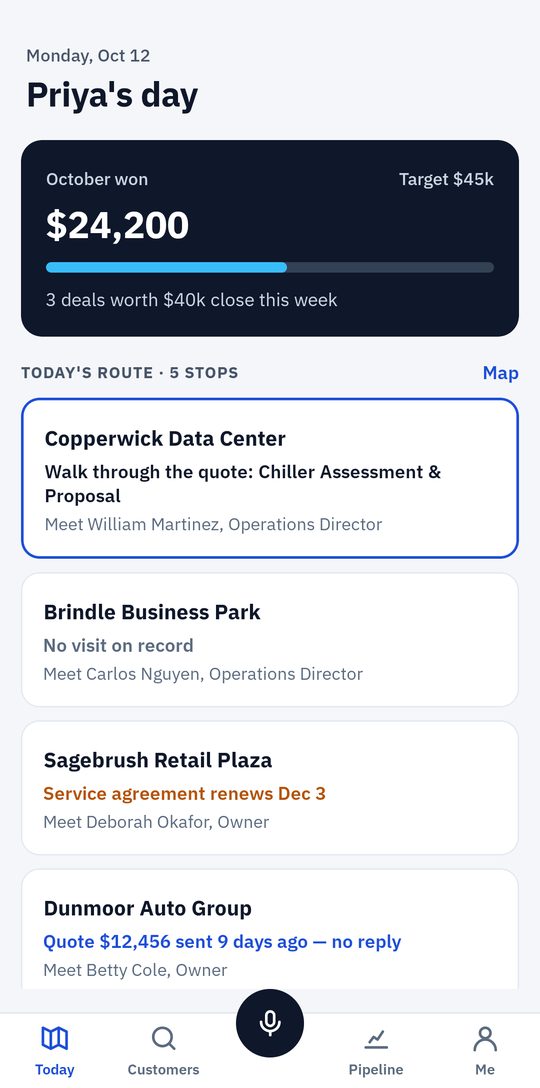
  • ✓ Sales reps: the day’s route and how the month stands against target, walk-in and cold-call capture, a quick quote the customer signs on the phone, the pipeline, visit notes and one search for customers and people
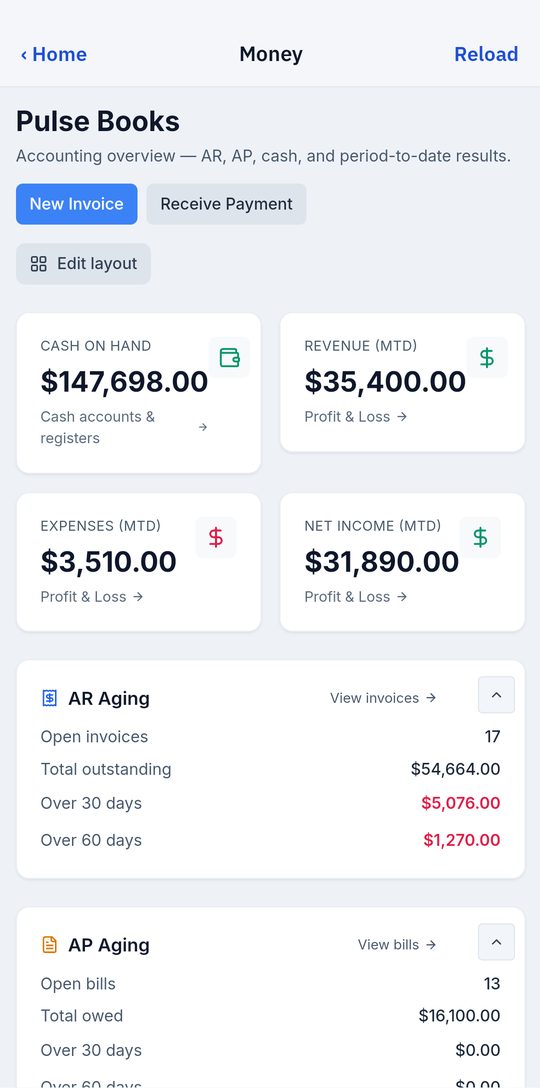
  • ✓ Owners: approvals, money from Pulse Books and the dispatch schedule
  • ✓ No signal? The day’s jobs and customers are saved on the phone, and the work sends as soon as it’s back
  • ✓ Light or dark, English or Spanish
  • ✓ Installed from your own Pulse: scan the code in Settings with the phone’s camera, then pair it. Updates come the same way

Some field-service platforms license the phone app per technician: Salesforce Field Service’s Technician license is $175 per user a month, billed yearly (checked October 13, 2026). In Pulse it comes with the license.

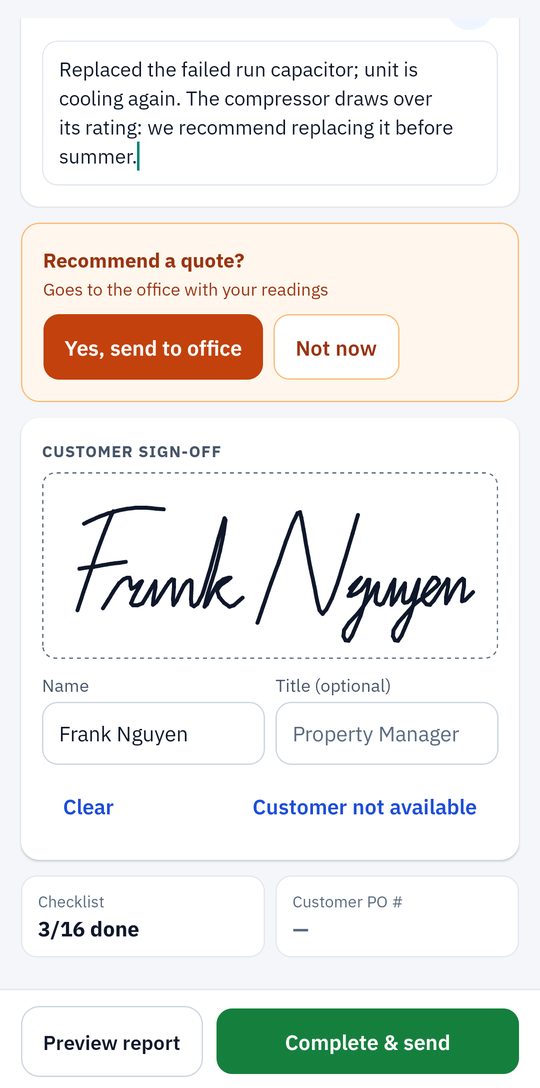
A technician wrapping up a job: the summary for the customer, a recommended quote for the office, and the customer's signature
Tech
A sales rep's day: the month's wins against target and today's route of five stops, each with why it matters
Sales rep
The owner's Money tab: cash on hand, revenue, expenses, net income and receivables aging from Pulse Books
Owner
Included with Pulse CRM Chrome · Edge

Customer email into the CRM, one click at a time.

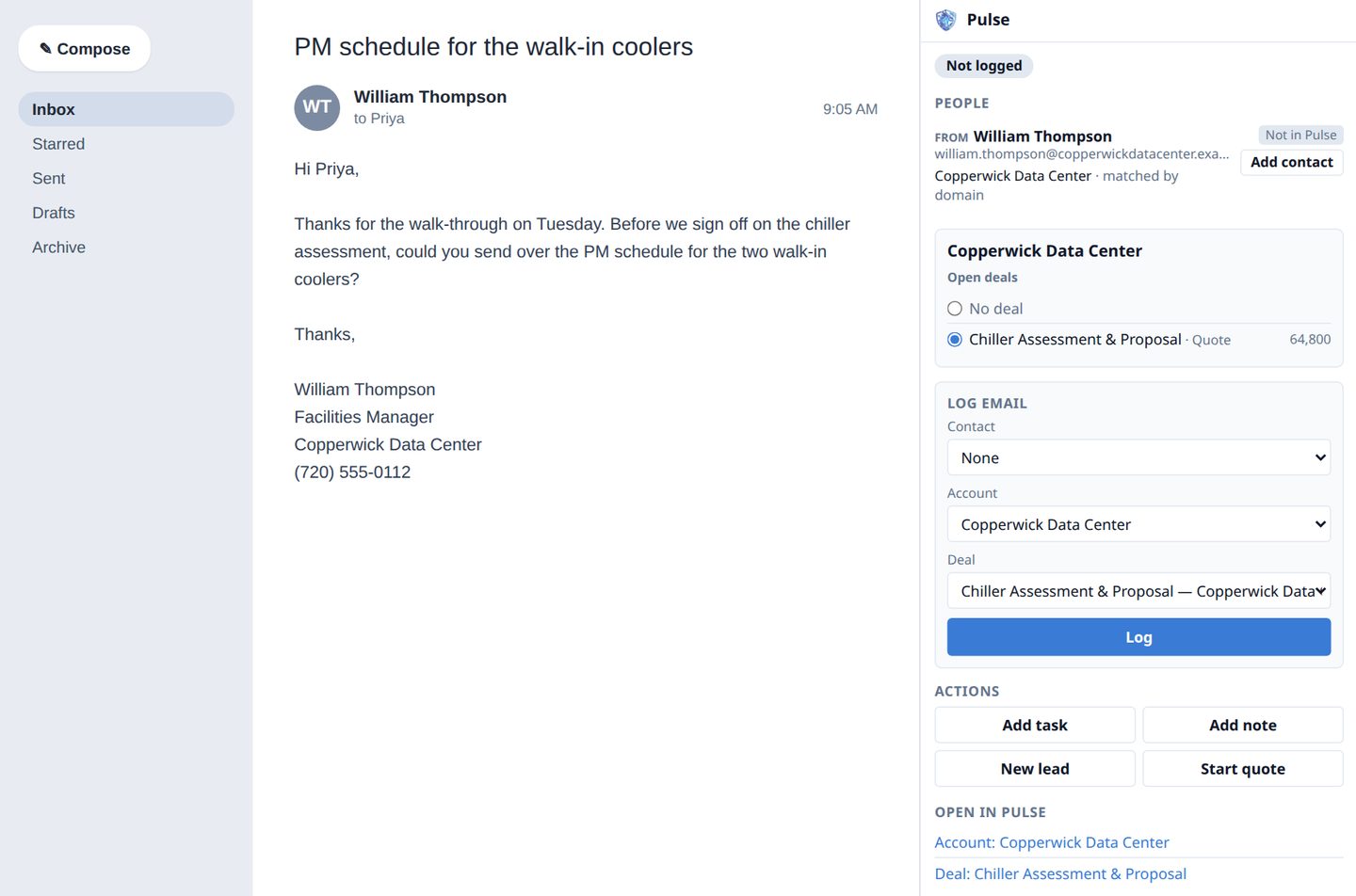
Pulse for Webmail is a browser extension. Open a customer’s email in your webmail and click the Pulse button: a side panel shows who they are in Pulse, next to the email.

  • ✓ The sender’s contact, account and open deals, at a glance
  • ✓ One click adds a new contact, filled in from their signature: name, title, phone, company and website
  • ✓ One click logs the email onto the contact, account or deal, on its Email tab; add a task from the same panel
  • ✓ Works in Gmail, Outlook on the web, Network Solutions and other Open-Xchange webmail, and most others: on webmail it doesn’t recognise, you pick the address from the page
  • ✓ No mailbox password and no inbox syncing. It reads an email only when you click (or on a webmail you choose to always allow), and nothing reaches Pulse until you click. Text only, no attachments
  • ✓ Installed from your own Pulse, under Settings → Integrations

Getting email into a CRM can be a paid add-on: Cirrus Insight’s Salesforce Sidebar for Gmail and Outlook is $11 per user a month (checked October 13, 2026). In Pulse it comes with CRM.

An email open in webmail with the Pulse side panel beside it: the sender's company and open deal found in Pulse, Add contact, and Log email
Included in every license

No per-seat fees · Quoting · Expense management · Inventory & purchasing · Customer statements & reminders · Website lead capture · API access · Automations & approvals (with CRM, Dispatch or Books) · The Android app · Pulse for Webmail (with CRM) · Signed updates & nightly backups. If it’s in the platform, it’s yours.